
Cybersecurity area
Email & Collaboration
Email & Collaboration protects email, document sharing, and work platforms that are among the most common entry points for phishing, malware, data leakage, and fraud.
Acronym Glossary
This glossary explains acronyms used in this part so the intended security function is clear.
- DMARC
- Domain-based Message Authentication, Reporting and ConformanceAn email policy defining how to handle messages that fail SPF or DKIM checks.
- SPF
- Sender Policy FrameworkA DNS mechanism defining which servers may send email on behalf of a domain.
- DKIM
- DomainKeys Identified MailCryptographic email signing that helps verify message integrity and domain ownership.
What This Area Covers
Email & Collaboration protects email, document sharing, collaboration platforms, and automated integration channels. These tools are the main user workspace and a common entry point for phishing, malware, data leakage, fraudulent communication, and identity compromise.
Why It Matters
A classic spam filter no longer covers the full risk. Organizations need anti-phishing, attachment and URL control, email gateways, DMARC/SPF/DKIM, collaboration app security, and response automation through webhooks. It is important to protect not only email delivery, but also clicks, file sharing, internal communication, and access to cloud collaboration.
How To Navigate This Area
Modern email and collaboration protection includes phishing detection, attachment and URL control, domain authentication, anti-harvesting, DLP, and response automation. Integration with Microsoft 365, Google Workspace, storage platforms, internal communication, and security operations is important because the attack often continues after message delivery.
Solution selection should consider the platform in use, deployment model, retroactive threat removal, sender identity controls, and integration with DLP or SOC processes. In Microsoft 365 or Google Workspace environments, API integration, retroactive search and removal, internal-message protection, and shared-file control are especially valuable.
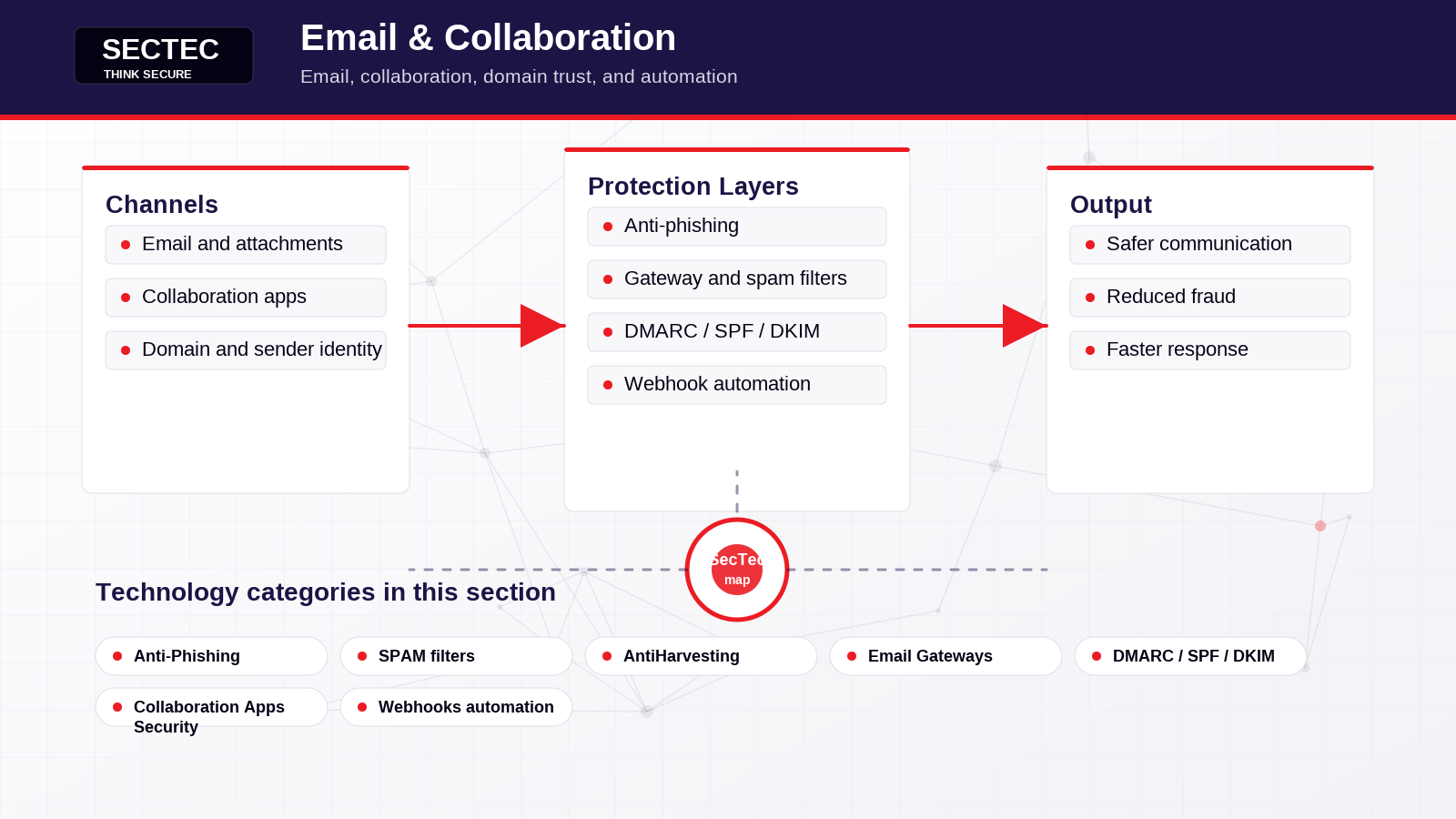
The technology list below works as a map of the Email & Collaboration area. The practical sequence is to name the security problem first, select the closest technology category second, and only then compare relevant vendors. This helps separate similar-sounding solutions and reduces the risk of adding another tool without a clear architectural role.
Technical Section Schema
Questions To Ask When Selecting A Solution
- Which channels are used most: email, Teams, SharePoint, OneDrive, Google Drive, or other platforms?
- Is the priority phishing, malware, domain spoofing, spam, or protection of shared data?
- Are DMARC, SPF, and DKIM configured correctly and reviewed regularly?
- Does the organization need to protect internal messages, files, and links after delivery?
- Can the solution automate response and connect to SIEM or SOAR?
How To Use This Section
Each technology page expands one category, explains its architectural role, and lists SecTec portfolio vendors related to that area. The section page is therefore the orientation layer, while the detail pages support concrete mapping to solutions.
Vendors From The SecTec Portfolio
Attack coverage and defensive context
MITRE ATT&CK® Enterprise version 19.1 is used as a reference model. The mapping is a SecTec expert interpretation and does not imply endorsement by MITRE.
Practical attack scenarios
- Phishing and identity abuseAn adversary manipulates a user, obtains credentials, or abuses a trusted account to gain access to the environment.
- Public application or API abuseAn adversary exploits a vulnerable web application, API, client-side code, or software component for initial access and execution.
- Cloud and SaaS compromiseAn adversary abuses cloud identities, permissions, configurations, or application integrations to access services and data.
- Supply chain and trusted accessAn adversary abuses a supplier, software dependency, external access path, or trusted relationship to bypass normal controls.
- Reconnaissance and attack surface mappingAn adversary collects information about people, systems, cloud services, and internet-facing infrastructure and searches for a viable initial-access path.
- Business Email Compromise and mailbox takeoverAn adversary takes over or impersonates a trusted email identity and abuses communications for fraud, payment diversion, data collection, or further phishing.
- Privilege escalation and persistenceAn adversary expands privileges, creates or modifies accounts and policies, and establishes repeatable access to systems, identities, or cloud environments.
- Insider threat and authorized access abuseAn insider or an adversary with a valid account abuses legitimate permissions to discover, copy, manipulate, or transfer sensitive data.
- Credential stuffing and password sprayingAn adversary automatically tests leaked username-password pairs or a small set of common passwords against many accounts.
Relevant ATT&CK techniques
- T1078 · Valid AccountsRespond
- T1204 · User ExecutionDetect, Prevent, Respond
- T1566 · PhishingDetect, Prevent, Respond
- T1589 · Gather Victim Identity InformationDetect, Prevent
- T1598 · Phishing for InformationDetect, Prevent, Respond